Mastering the Gildan 5000 Color Chart Unisex T-Shirt Mockup
When you are bringing a clothing brand to life, the gap between a digital sketch and a physical product often feels massive. You have the artwork, the vision, and the marketing plan, but you need to see how that design actually drapes over the human form. This is where the utility of a high-quality template becomes undeniable. Specifically, working with the Gildan 5000 Color Chart Unisex T-Shirt mockup is a standard practice for designers who need reliability and realism. It is not just about seeing the color; it is about understanding how the fabric interacts with the print before you spend money on inventory.
The Gildan 5000 is arguably the industry workhorse. It is the shirt you see at festivals, corporate events, and in the starter packs of thousands of print-on-demand businesses. Because of this ubiquity, using it as your baseline for design presentation makes a lot of sense. Your clients and customers already know what this shirt feels like. They know the weight, the fit, and the texture. When you present a design on a mockup that mimics the Gildan 5000 Color Chart Unisex T-Shirt, you are grounding your digital art in physical reality. You are moving away from abstract concepts and into tangible products.
The Anatomy of the Digital File
Let’s talk about exactly what you are working with. The asset you will be receiving is a high-resolution JPG image at 300 dpi. This resolution is critical. It ensures that if you decide to use these images for print catalogs or large-scale web banners, the pixelation will be non-existent. You get a single JPEG file that is clean—no watermarks, no confusing smart objects, and no layered chaos to navigate if you aren't a Photoshop wizard.
However, there is a specific constraint you need to understand: this is a "flattened" file. The t-shirt mockup cannot be split or edited separately from the background in a traditional layer sense. For many, this is actually a blessing in disguise. It forces a streamlined workflow. You aren't wasting time adjusting shadow layers or messing with lighting effects. You have a blank canvas—a digital mannequin—waiting for your artwork.
Here is the practical reality of the file structure:
- High-Quality JPEG: Ready for immediate use in presentations or quick social media posts.
- Blank State: The file is empty, meaning it serves as a pure vessel for your logo design or illustration.
- Digital Format: It is a single entity. You cannot isolate the left sleeve from the right sleeve in the file itself; you treat the image as a whole unit.
Integrating Your Artwork: A Practical Guide
So, you have the file, and you have your vector graphics or raster art. How do you combine them? Because the JPEG is a single entity, you cannot simply "paste" your design into a mockup generator that requires layers. Instead, you need to use software that allows for image compositing. This is where tools like Adobe Photoshop, CorelDraw, or Illustrator come into play. Even free online software can handle this if you know where to look.
The process involves layering your design on top of the mockup. You will place your artwork on a layer above the JPEG. Then, you need to blend it. In Photoshop, this usually involves changing the blending mode of your artwork layer to "Multiply" (for dark designs on light shirts) or using "Screen/Lighten" (for light designs on dark shirts). This simple technique allows the texture of the Gildan 5000 Color Chart Unisex T-Shirt to show through your ink, giving it that authentic, printed look rather than a sticker look.
Visual Hierarchy and Brand Consistency
Why does the specific model of the shirt matter for your brand identity? It comes down to visual hierarchy and audience expectation. The Gildan 5000 has a distinct cut—classic, not too slim, not too boxy. If your brand is selling premium, tailored fashion, this mockup might feel too casual. But if your brand is rooted in streetwear, merch, or accessible apparel, this silhouette is perfect.
Using a consistent mockup style across your portfolio helps with brand recognition. If a customer sees your designs always presented on the same style of unisex tee, they begin to associate that shape with your quality. It creates a cohesive lookbook. When you are designing for social media graphics or an e-commerce site, consistency is the anchor that holds your visual strategy together.
Color Theory and the Gildan Palette
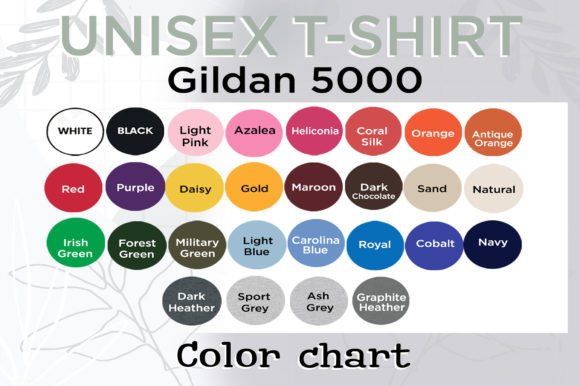
The "Color Chart" aspect of the Gildan 5000 is vast. While your mockup file might be a specific color, understanding the full range helps you plan collections. The Gildan 5000 is famous for its durability and its color retention. When you mock up your designs, pay attention to how your ink colors react to the shirt color.
- Contrast is King: A neon pink design might pop on a Black or Sport Grey shirt but get lost on a Daisy or Gold fabric.
- Soft Hand Feel: Modern printing often aims for a "soft hand" feel where the ink sinks into the fabric. Your mockup should reflect this subtlety rather than looking like a heavy plastic decal.
Remember, the goal of using a premium font or a high-end illustration is defeated if the presentation looks cheap. The Gildan 5000 is a democratic canvas, but it needs to be treated with respect in the design phase to look professional in the sales phase.
Choosing the Right Tools for the Job
You don't need to be a creative professional to use these files effectively, but you do need the right environment. As mentioned, Photoshop is the gold standard, but it isn't the only option.
Software Options for Editing
If you are on a budget, look into Photopea. It is a free online editor that mimics Photoshop’s interface and handles JPEG layering beautifully. You can import the blank Gildan 5000 Color Chart Unisex T-Shirt file, place your design on top, adjust the opacity or blending mode, and export a finished product image in minutes.
For those using Illustrator, you can place the JPEG into your artboard and draw your vector paths directly over it. This is excellent for checking scale and placement. Does the print area match the standard chest dimensions? Is the design too high near the collar? These are the practical checks you perform during this stage.
Typography and Apparel Design
It is impossible to discuss mockups without discussing typography. The font you choose for a t-shirt is just as important as the graphic. A heavy, blocky sans serif font works well for bold statements, while a flowing script font might suit a boutique or feminine brand.
When placing text onto the Gildan 5000 mockup, consider the "x-height" and legibility. T-shirts are viewed from a distance. A complex handwritten font might look beautiful on your computer screen but become an unreadable mess when printed on cotton. Always zoom out. Look at your mockup at 25% size. If you can't read the text then, your audience won't be able to read it on Instagram or from across the street.
The interplay between the typeface and the shirt color creates the mood. A serif font on a white Gildan 5000 can feel collegiate or vintage. The same font in gold foil on a black tee feels luxurious. The mockup allows you to test these vibes instantly without ordering a sample pack.
Commercial Viability and Licensing
Finally, let's touch on the business side. You are likely using these mockups to sell something. Whether you are a publisher creating assets for a client, or a crafter selling on Etsy, the presentation is your storefront.
Using a high-quality, 300 dpi mockup signals professionalism. It tells the buyer that you care about the details. It bridges the gap between the digital design assets and the physical product they will receive. When you present your artwork on a recognizable canvas like the Gildan 5000, you reduce buyer hesitation. They know what the fit is. They know the style.
So, download that JPEG. Fire up your editor. Treat the blank shirt not as a static image, but as a dynamic stage for your creativity. Whether you are crafting a logo design for a startup or a slogan for a movement, the Gildan 5000 Color Chart Unisex T-Shirt mockup is the reliable foundation you need to build upon.