7 Color Pop Lightroom Mobile Presets: Vibrant Edits in a Click
Transform Your Photo Library Instantly
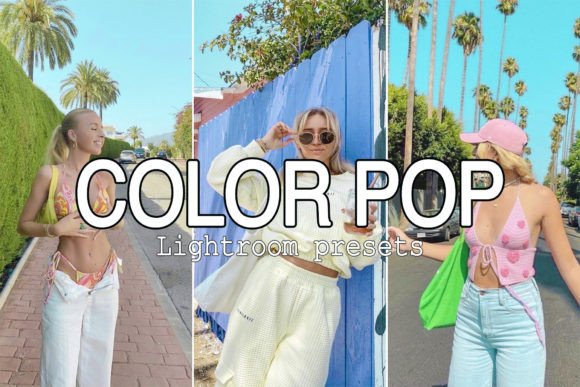
If you have ever scrolled through Instagram or Pinterest and wondered how influencers achieve those high-contrast, vivid images, the secret often lies in the editing workflow. However, manually adjusting curves, saturation, and tones for every single photo is time-consuming. This is where the 7 Color Pop Lightroom Mobile Presets collection steps in. It is designed to be a powerful, fast photo editing tool that allows you to create incredible images with a single click. Whether you are a professional photographer needing a quick baseline or a hobbyist wanting to improve your travel snapshots, this collection bridges the gap between raw files and a polished, professional aesthetic.
The core appeal of these presets lies in their ability to inject life into flat images. We have all taken photos on overcast days or in tricky lighting where the colors look muddy. The Color Pop presets are engineered to counteract this. They boost the vibrancy of greens, blues, and skin tones while maintaining a natural look. It is not about oversaturating the image until it looks artificial; it is about enhancing the existing light and color to make the subject stand out. This collection includes both 7 Mobile Lightroom Presets (DNG files) and 7 Desktop Adobe Lightroom Presets (XMP files), ensuring that your workflow remains consistent regardless of whether you are editing on a phone or a computer.
The Technical Edge: Versatility and File Compatibility
One of the most significant advantages of the 7 Color Pop Lightroom Mobile Presets is the inclusion of two distinct file formats. For desktop users, the XMP files integrate seamlessly into Adobe Lightroom on both Windows and MacOS. For mobile users, the DNG files are compatible with the Lightroom app on both Android and iOS. This dual-format approach is essential for modern creators who might start an edit on their desktop but need to finalize it on their tablet while commuting, or vice versa.
Furthermore, a common pain point with mobile editing is the reliance on an internet connection. With these presets, you can keep the files stored directly within your Lightroom Mobile app. Once imported, you can use the presets with or without internet access. This makes them an invaluable asset for travelers who may find themselves in remote locations with spotty Wi-Fi but still want to edit and post their content. The workflow is designed to be as frictionless as possible: import, click, and publish.
Practical Application: Summer, Outdoor, and Lifestyle Photography
While these presets can technically be applied to any image, they truly shine in specific genres. The 7 Color Pop Lightroom Mobile Presets are specifically tuned for Summer, Outdoor, Lifestyle, and Travel photography.
- Summer & Travel: When you are shooting outdoors, the sunlight can often wash out colors. These presets restore the deep blue of the ocean or the lush green of a forest, turning a standard vacation photo into a vibrant memory.
- Lifestyle & Portraits: For content creators and bloggers, consistency is key. Using these presets helps maintain a cohesive color palette across your feed. The adjustments to skin tones ensure that people still look natural, even while the background colors are popping.
- Product Photography: Small business owners can use these to make their products stand out. A vibrant, well-lit image conveys quality and professionalism, which can directly influence buying decisions.
Installation Guide: How to Load Your Presets
Getting started is straightforward, though the process differs slightly between mobile and desktop. Here is a step-by-step guide to installing the 7 Color Pop Lightroom Mobile Presets on your smartphone.
- Download and Unzip: After your purchase, you will receive a ZIP file. Open this file and save the DNG files to your phone’s photo library or a dedicated folder.
- Open in Lightroom: Launch the Lightroom Mobile app and import the DNG files. These will appear as images, but they contain the preset data.
- Create the Preset: Select one of the DNG images. Click on the three dots (•••) in the top right corner of the app. Select the option “Create Preset.”
- Name and Save: Give the preset a descriptive name (e.g., "Color Pop 1") and save it. Repeat this for all seven files. Once saved, the presets will appear in your "User Presets" section, ready to be applied to any future photo.
For desktop users, simply drag the XMP files into the "Develop" module presets folder within Lightroom, and they will appear in your presets panel automatically.
Refining Your Look: The Art of the Adjustment
It is important to approach presets as a starting point rather than a final destination. As noted in the product details, every photo is different, and all Lightroom presets work differently depending on the lighting conditions of the original shot. A preset that looks perfect on a sunny beach photo might look slightly different on a photo taken in the shade.
Therefore, making small adjustments is crucial for the best result. After applying one of the 7 Color Pop Lightroom Mobile Presets, check the exposure. If your original image was underexposed, the preset might make it too dark; simply slide the "Exposure" tool to the right. Similarly, check the white balance. If the image looks too warm (yellow) or too cool (blue) for your taste, tweak the temperature slider.
This flexibility is what makes these presets a professional tool. They handle the heavy lifting of color grading and contrast, saving you 90% of the work, but they leave the final 10%—the creative nuance—up to you. This ensures that your images retain your unique style while benefiting from a high-quality color grade.
Conclusion
The 7 Color Pop Lightroom Mobile Presets offer a practical solution for anyone looking to enhance their visual content. By providing both mobile and desktop files, they cater to a flexible, modern workflow. Whether you are a blogger trying to maintain a cohesive aesthetic, a traveler documenting your journey, or a small business owner showcasing products, these presets provide the vibrant, professional finish you need. Stop spending hours tweaking sliders and start enjoying the creative process with edits that are fast, consistent, and beautiful.